
Introduction to GitGUI
Welcome to GitGUI — a lightweight, visual Git client designed for developers who value speed and simplicity.
What is GitGUI?
GitGUI is a desktop application that provides a visual interface for Git. Think of it as a lighter, faster alternative to GitKraken or Sourcetree, with unique features like voice-powered commits and extensive keyboard shortcuts.
Key Features
- Visual Commit Graph — See your entire Git history with a beautiful, color-coded graph
- Intuitive Staging — Stage and unstage files with a single click
- Voice Commands — Speak your commit messages using local AI (no cloud required)
- Keyboard Shortcuts — Every action has a shortcut for maximum productivity
- Drag & Drop Merging — Merge branches by dragging one onto another
- Split/Unified Diffs — View changes in your preferred format
- File History — Right-click any file to see its complete history
- Stash Management — Save and restore work-in-progress with ease
Who is GitGUI For?
GitGUI is perfect for:
- Individual developers who want a visual overview of their repositories
- Teams who need to quickly understand branch histories
- Open source contributors managing multiple projects
- Git learners who want to visualize what's happening under the hood
Getting Started
- Download GitGUI for your platform
- Install and activate your license
- Open a repository and start working
Interface Overview
GitGUI's interface is divided into three main areas:
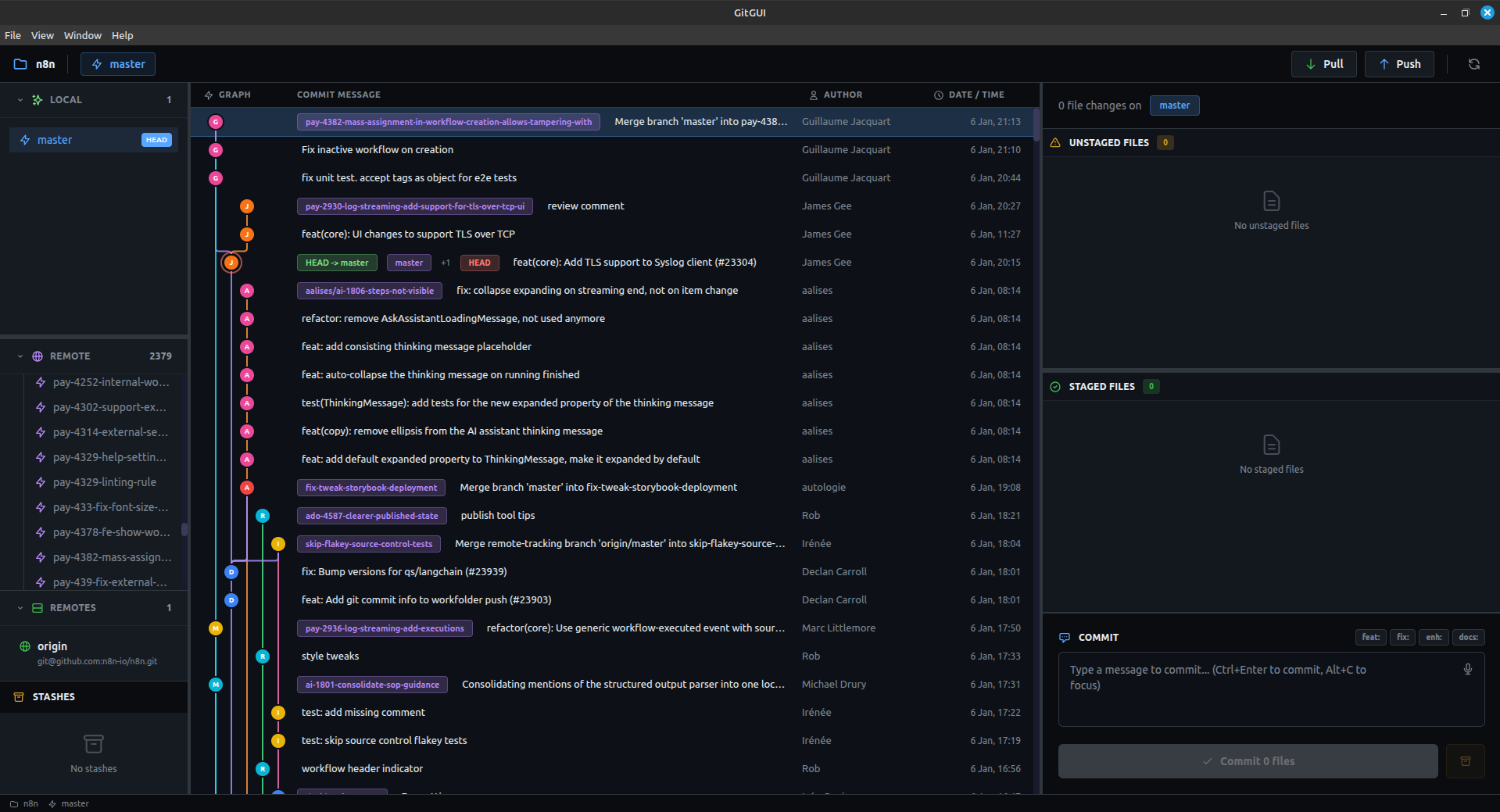
- Sidebar (left) — Browse local branches, remote branches, and stashes
- Commit Graph (centre) — Visual history of all commits with branch lines
- Staging Panel (right) — Manage unstaged/staged files and write commits
Next Steps
- Installation Guide — Get GitGUI running on your machine
- Opening a Repository — Start working with your code
- Keyboard Shortcuts — Master the shortcuts for maximum speed